Your Claude Code limits, in the menu bar.
Lomi is a macOS menu bar app for Claude Code. One click shows how much of your usage limit is left and when it resets, with every open session, its subagents and what they cost.
brew install --cask endorphin-ai/tap/lomi
Version 0.1.4, released . macOS 12 or later, Apple Silicon or Intel. Signed and notarized by Apple.

8% Fresh
One window for everything Claude Code is doing
Click the face in the menu bar and the window opens under it. Lomi reads Claude Code's own files on your Mac. It does not change your sessions.
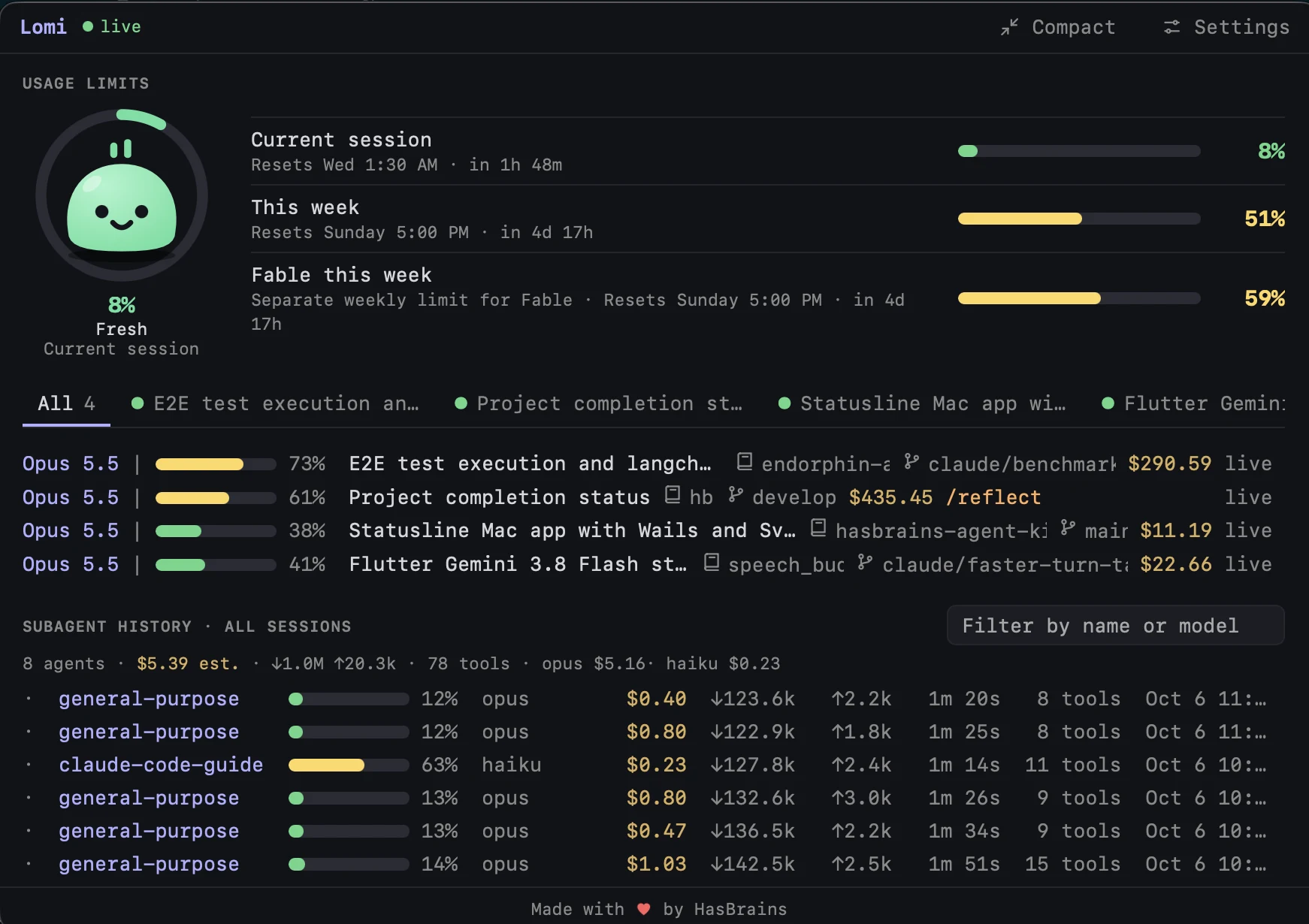
- Usage limits
- Current session, this week, and per-model limits such as "Fable this week". Each one shows its reset time.
- Sessions
- One row and one tab for each open Claude Code session: model, context %, cost, repository and branch.
- Subagents
- Model, context %, cost, tokens, duration and tool calls for each subagent.
- The number in the menu bar
- The used % of your session limit sits beside the icon, so you can read it without opening anything.
Lomi gets tired as you use up the limit
The character in the ring has seven moods. A look at the menu bar tells you where you are.
 0–20%Fresh
 20–40%Normal
 40–60%Working
 60–75%Getting heavy
 75–90%Tired
 90–99%Almost out
 100%Out of tokens
Install Lomi
You need macOS 12 or later and Claude Code.
-
Install the app
With Homebrew:
brew install --cask endorphin-ai/tap/lomiWithout Homebrew:
curl -fsSL https://raw.githubusercontent.com/endorphin-ai/hasbrains-agent-kit/main/app/lomi/install.sh | shBoth put Lomi in
/Applications. -
Start it
open /Applications/Lomi.appLomi has no Dock icon. Its face appears in the menu bar.
-
Install the bridge
Click the Lomi icon, then Settings, then Install bridge. Lomi shows no usage limits until you do this once.
The bridge is one line in your Claude Code status line script. It gives Lomi live data, and Lomi keeps a backup of the script.
-
Check that it works
Send a message in any Claude Code session. In a few seconds the session shows live and the usage limits fill in.
Update
brew upgrade --cask lomi
Remove
curl -fsSL https://raw.githubusercontent.com/endorphin-ai/hasbrains-agent-kit/main/app/lomi/uninstall.sh | sh
This deletes the app, its settings and saved data, and takes the bridge line out of your status line script.
The full guide on GitHub covers settings, starting at login and the Dock.
Questions
What does Lomi read on my Mac?
Lomi reads the files that Claude Code already keeps on your Mac, and the live data from the bridge line in your status line script. It does not change your sessions. One option, per-model weekly limits, uses your Claude login. It is in Settings with a note to read before you turn it on.
What is the bridge?
One line that Lomi adds to your Claude Code status line script. Claude Code runs that script each time it updates, and the line passes live data to Lomi. Lomi keeps a backup of the script, and the uninstall command takes the line out.
How does Lomi know what a subagent cost?
It multiplies the subagent's tokens by a price for each model, in USD per 1M tokens. The result is an estimate. You can change the prices in Settings.
When does a bar turn yellow or red?
When usage passes a threshold. You set both thresholds in Settings.
Can Lomi start when I log in?
Yes. Open Settings and turn on Start Lomi when you log in.
How do I close or quit it?
Press Escape or click elsewhere to close the window. Right-click the menu bar icon to quit.
I see no usage limits. What is wrong?
The bridge is probably not installed. Open Settings and check that it shows "Bridge installed". If it does, open a new Claude Code session and send a message.
Where do I report a problem?
Open an issue in the GitHub repository.